The approach taken and why
I decided to use screen capture software to provide feedback on assessed work to two groups of International students on English for Academic Purposes modules. I felt that providing online audio/video feedback for work on English Language modules would increase student satisfaction and make the assessment and feedback process more effective overall. It would also enable students to understand the process of using a Turnitin Dropbox (TAD) and provide an extra support to students still struggling with the concept of originality in their work.
Work is submitted and marked using Grademark, according to predetermined criteria. The Grademark “labels” are colour-coded. Using screen capture, I talk through the comments, as I scroll through the document, highlighting particular areas or concerns. This recording is saved as an MP4 file and attached to the Grade Centre submission page for the student. Students are able to see their grade, the feedback and the MP4 file.
The students were very enthusiastic about the feedback format and in general found it encouraging. At the end of the semester, they were asked to complete a survey.
Advantages Benefits of the approach for you and the students
The software, Snagit is very easy to set up and use. I am able to personalise the feedback and I feel there is more opportunity to give more complete feedback than if I am writing. I can make encouraging comments, suggestions from the general to the specific and provide pointers for future improvement. Even with Quickmark comments, the process seems to be less time-consuming than when giving full written feedback. The fact that the document with my comments is “captured” the student can see the part of the text I am highlighting as I talk.
Feedback from the students was very positive. Comments emphasised that it was like having a one to one tutorial, it was easy to follow, and they could clearly see how to improve on their mistakes and so on. 100% of respondents agreed that they found the screen cast feedback very helpful. 87% of respondents agreed that it was motivating to hear the tutor discussing the work and 93% said they listened to the recorded feedback rather than just look at the grade. 87% answered that they preferred audio/video feedback to traditional written feedback.
Disadvantages Any unexpected outcomes or ways you would change your approach next time
Although a degree of written feedback was provided using Quickmark comments, I was surprised that some students (67%) commented that they would still prefer to have fuller written feedback on their work combined with screen-cast feedback.
The main drawback is that the software licence is limited to a specific computer, but I now also have this for my own computer which enables me to also catch up on marking from home. However, uploading the MP4 files to the Grade Centre page is a slow process when not using the Keele network.
Key recommendations If you were talking to a colleague about the approach what would be the key things you would tell them to help them get the most from your approach
This short study convinced me that the use of technology to provide feedback has an overall positive effect on learning and teaching. I continue to use this approach and offer some suggestions to those considering adopting this:
Use a good microphone: I have a Snowball which works well
Be systematic in providing feedback, concentrating on areas in order according to the marking criteria
Always check that the file is saved and has uploaded
Explain clearly to students, with a demonstration, as to how they can access the feedback and check that they have been able to do so
Proficiency in providing clear, concise and helpful feedback does improve with practice.
Student Engagement
Social media that helps students engage with their learning, through co-creation, co-learning and co-designing with other stakeholders (Healey et al., 2014), is often used as a tool to facilitate knowledge development.
However existing methods that use social media as an inclusive learning tool, although proven to be effective in some instances for instance helping to facilitate and support student-centred learning activities (Halverson, 2011), may also cause distractions and also preclude some learners (e.g. international students).
Storify?
One approach that I have used to address some of these issues is Storify (www.storify.com). Storify is a free online tool through which online resources are used to create ‘stories’ in order to showcase specific topics, products, news events and so on. One of the benefits of this for facilitators is that when it is set up, it can be easily added to and changed, making it a resource that can offer ongoing support and that develops over time.
Stories comprise of a variety of resources - web links, images (Flickr, Getty and Instagram), videos (YouTube), Tweets, Facebook links, music (Soundcloud) (Fig. 1). Generally if it is on the internet it can be used.
Fig 1. Online resources that can be
incorporated into ‘stories’
Storify as a learning tool
From a student perspective the benefit of these stories for students is that they can view a topic and related content all in one place. This focused resource then can help support knowledge development (by linking case studies, news articles, and other articles), revision and crucially co-creative engagement. Furthermore, access to the stories requires no login and can be embedded, making it an ideal tool for inclusive learning activities.
I have introduced this in Digital and Marketing Communications, a level 5 marketing module. Students use Storify to help relate theoretical content to real-life examples. Marketing as a topic is perfect for this, due to the constant examples and ever changing context, but it is easily adaptable to any subject that encourages critical thinking and expansion beyond the prescribed curriculum.
Fig 2. A digital marketing story embedded in the Keele Learning Environment
So has it been successful? While it is not without small issues (e.g. encouraging students to provide resources for inclusion), there are about 500 views for each topic at the time of writing, and this will more than likely increase now that exam period is approaching. Students have also reacted positively to this resource, noting the extra support, engagement, and contemporary knowledge of the marketing environment that it offers.
If you would like any more information on Storify as a learning tool, or wish for a more in depth demonstration of how it could be incorporated into modules, please feel free to contact me at j.bailey3@keele.ac.uk.
References
Halverson, E (2011), "Do social networking technologies have a place in formal learning environments?," On The Horizon-The Strategic Planning Resource for Education Professionals, 19 (1), 62-67.
Healey, M., A. Flint, and K Harrington (2014), "Engagement Through Partnership: Students as Partners in Learning and Teaching in Higher Education." York: Higher Education Academy.
Neier, S, and L Zayer (2015), "Students’ Perceptions and Experiences of Social Media in Higher Education," Journal of Marketing Education, ISSUE, 1-11.
Taylor, S, G Hunter, H Melton, and S Goodwin (2011), "Student Engagement and Marketing Classes," Journal of Marketing Education, 33 (1), 73-92.
The Tune In calendar (Available via (www.keele.ac.uk/studentlearning/tuneincalendar/) is a central calendar of developmental workshops and opportunities which all students and staff can attend at Keele University. This calendar is part of the Development Strand, which in turn is part of the Distinctive Keele Curriculum (Keele University, 2016a). Workshops are offered by colleagues from Student Learning, the Library, Health Library, Careers and Employability Services and Counselling and Mental Health Support Services. The live TuneIN calendar can be seen below
Many students and staff are unaware of these opportunities and this short piece will detail the provision which the Student Learning (SL) team contribute to the Tune In calendar.
Allen and Clarke (2007) note importance of such metacognitive and generic skills, like those featured on the Tune In calendar, as crucial to success both in HE and in the careers of our learners. While they do note that it is beneficial to have these types of skills developed within academic programmes, providing our students, and staff, with additional opportunities to develop further. These opportunities promote a reflective mindset and afford more opportunities to work towards Keele’s graduate attributes.
Student Learning Tune In workshops
The Student Learning team offers several academic, personal and professional skills workshops each week which run from October to May each academic year. These are advertised to students via two means: firstly, the workshops are advertised via the Tune In calendar website; secondly, all undergraduate and postgraduate students also receive a weekly email, named the ‘Study Skill Digest’, detailing our workshops.
These free workshops, designed to complement Keele’s academic programmes, are open to all staff and students at Keele. This presents a number of challenges for us as lecturers. Firstly, we have some idea, through our electronic booking forms, how many students will attend, but this does not always hold true so requires a degree of flexibility on group tasks and other teaching methodologies within the session. Secondly, it is not uncommon for us to need to cater for a significant range in academic levels. Any one session could have 1st year undergraduates through to final year PhD students within and our materials and delivery need to be flexible enough to handle this variety.
In the 2013/14 academic year the number of students attending these optional workshops rose to 350, a significant leap from the 50 that attended in 2012/13. The following data, gathered from student evaluative questionnaires (SEQ) at the end of each workshop, indicates a positive experience for learners at our sessions. SEQ’s have a contested worth in evaluating teaching practices, with some feeling they can ‘dumb-down’ discussions about and data surrounding teaching and learning (Johnson, 2000). However, for services such as ours which can, in some areas, have little long-term contact with students, they represent a valid and useful method of gaining feedback about the sessions themselves (Parlett & Hamilton, 1972), if not their longer term impact. Table 1, however, demonstrates a comparison across the last two academic years from SEQs:
2013/14
2014/15
Number of students attended workshops
340
182
Average feedback score (1-5 scale)
4.5
4.5
% of students that would attend another workshop
94%
97%
% of students that would like to see these sessions embedded in their programmes
85%
89%
Table 1: Comparative data across 2013/14 and 2014/15
The data for 2015/16 has continued to echo the above, although we have changed the SEQ questions this year to further enact Kirkpatrick’s (2006) evaluative framework. In 2015/16, we have achieved an average feedback rating of 4.6/5 and 100% of students who attended the Student Learning workshops from the Tune In calendar felt it would have a positive impact on their studies and would recommend the workshops to students wanting to further develop their skills. We are currently working on a means of evaluating the longer term impact of the studies and hope to disseminate these findings at a later date.
While we have seen a decrease in attendance at freestanding workshops, this could be explained by the significantly larger number of students accessing our embedding study skills workshops, detailed in Issue 5 of the Journal of Academic Development and Education (JADE) (Little, 2016). One could infer from this that more students are getting this explicit learning development in their programmes thus not needing to perhaps visit freestanding, extra-curricular workshops.
We have also seen a dramatic increase in the number of students attending our Write Direction Study Skills service (Keele University, 2016b). The Write Direction is a confidential one-to-one tutoring service which allows students to work on any area of their academic, personal and professional skills on an individual basis. We predominantly focus on academic practices such as essay planning and academic writing but do also focus on other skills such as presentation skills and time management to name a few. If you feel a student may benefit from seeing us advise them to contact the team on student.learning@keele.ac.uk. Alternatively they can come to our drop in service which runs every Wednesday afternoon 2-4pm in the Tawney building.
Conclusions: What next?
The Tune In calendar is a valuable addition to Keele’s academic programmes and to many student’s surprise, attendance at any of the workshops is completely and utterly free of charge! If colleagues would like more information please do visit http://www.keele.ac.uk/studentlearning/tuneincalendar/ to view the Tune In offering. Alternatively, feel free to contact the Student Learning team on student.learning@keele.ac.uk to learn more.
Reference List
Allan, J. and Clarke, K. (2007) 'Nurturing Supportive Learning Environments in Higher Education through the Teaching of Study Skills: To Embed or Not to Embed?', International Journal of Teaching and Learning in Higher Education. 19 (1): 64-76.
Johnson, R. (2000) 'The Authority of the Student Questionnaire', Teaching in Higher Education. 5 (4): 419-434.
Keele University. (2016a). Distinctive Keele Curriculum. [Online]. [Accessed 29th February 2016]. Available from: http://www.keele.ac.uk/distinctive/
Keele University. (2016b). Write Direction: Study Skills Advice. [Online]. [Accessed 29th February 2016]. Available from: http://www.keele.ac.uk/writedirection/Kirkpatrick, D. L. (2006). Evaluating training programs: The four levels. 3rd edn. San Francisco: Berrett-Koehler.
Little, C. (2016). The DKC People? The Student Learning team and the growth of embedding learning development in academic programmes.[Online] Journal of Academic Development and Education. 5: 58-63. [Accessed 29th February 2016]. Available from: https://jadekeele.files.wordpress.com/2016/01/jade-fifth-edition.pdf
Parlett, M. and Hamilton, D. (1972) Evaluation as Illumination: A New Approach to the Study of Innovatory Programs. Occasional Paper, London: Nuffield Foundation.
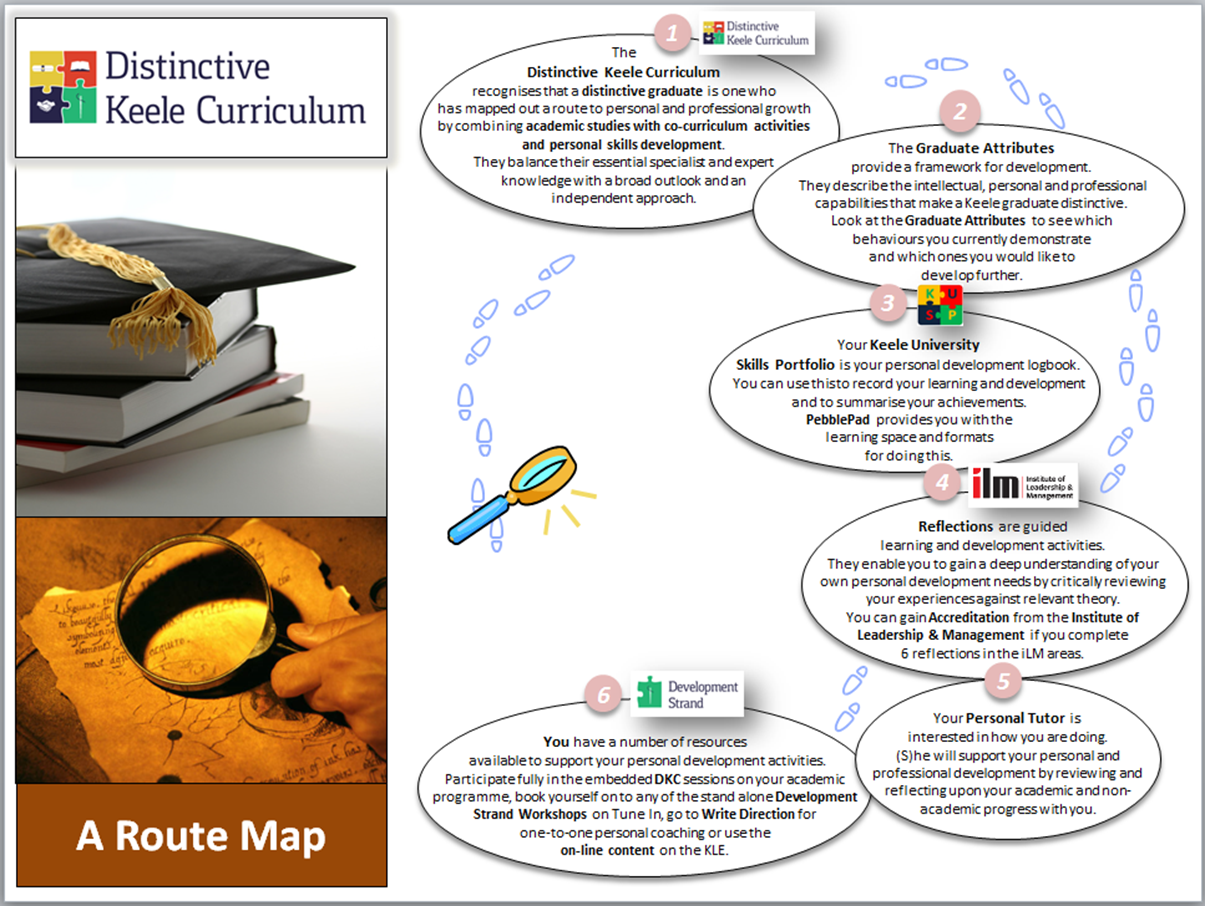
Keele University has focussed on differentiating itself in its market sector by introducing a ‘distinctive’ element to the curriculum: a framework that articulates the opportunities for an individual to design their own student experience:
Every student is encouraged to develop their own knowledge, skills and attitudes in order to make a difference to their own world – and create a ‘personalised learning experience’ (Campbell, et al., 2007) (Department for Education and Skills, 2004). However, when it comes to study skills and professional development sessions we, as academics, identify the needs of students through our own experience of student problems – these might be common mistakes in written assignments, visible difficulties in class discussions, or the personal assessment of capabilities during coaching sessions.
In Biochemistry & Biomedical Science we decided to turn things around and let the students drive their own development!
Research suggests that significant benefits are realised if students are in control of their own destiny – these are seen as improvements in ‘general well-being, behaviour and values, and academic achievement’ (Kohn, 1993). These finding are echoed in the work of Kay & LeSage (2009) who looked closely at the relationship between personalisation and achievement. Streeting & Wise (2009) also suggest that student engagement will follow if students are actively involved in the decision-making process, invited to help in curriculum design and given some control over the learning environment.
As teachers, the task at hand is to establish ways of achieving student engagement (the motivation, self-discipline and reflection that leads to a deeper understanding) when we are faced with large groups of diverse students with differing interests, abilities and needs.
We decided to try to tailor a learning intervention in the form of a skills conference.
A different approach
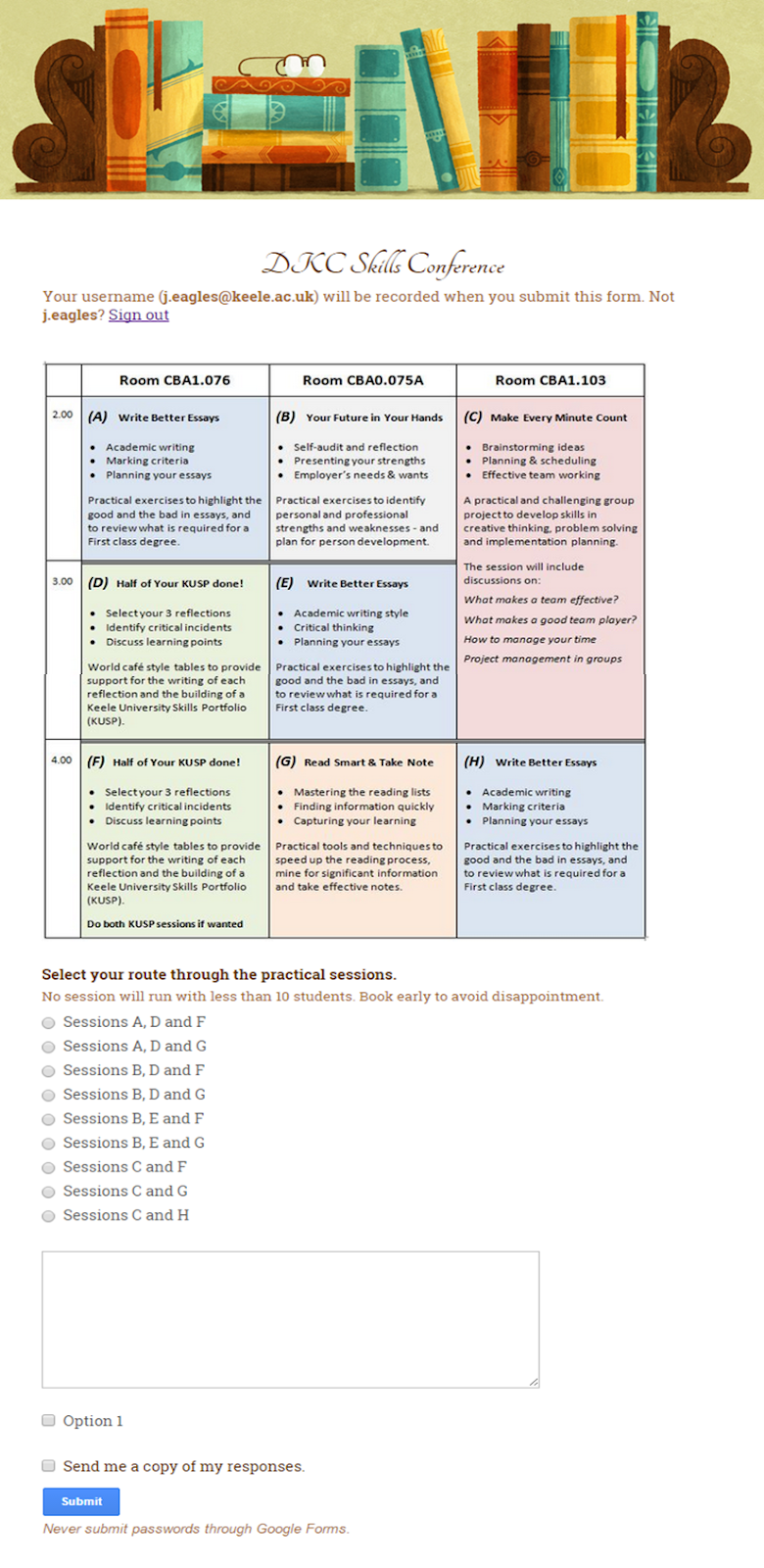
In the first instance we created a ‘conference style’ matrix of study skills sessions and we asked students to select which sessions they would like to attend. The Google booking form (see Fig 1) gave us a comprehensive picture of which students had replied and how many students were booked in to each session. We asked students to assemble in a main room for an opening and introductory few minutes before they then divided and made their way to their own programmes of study. This created a real buzz around the event and there was a lot of discussion between students about what they had chosen and why. The feedback from the conference was extremely encouraging. Students appreciated the choice element and did feel in control of their study.
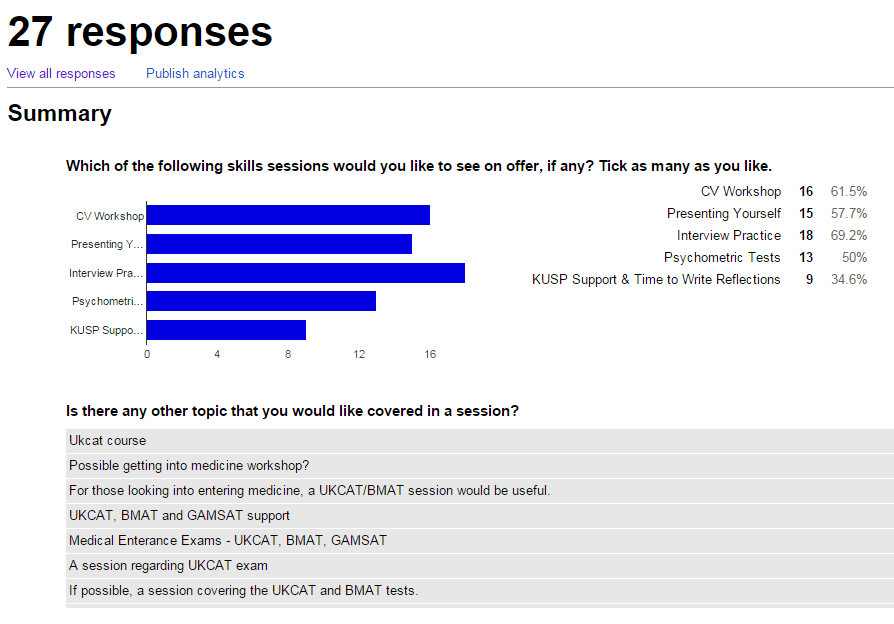
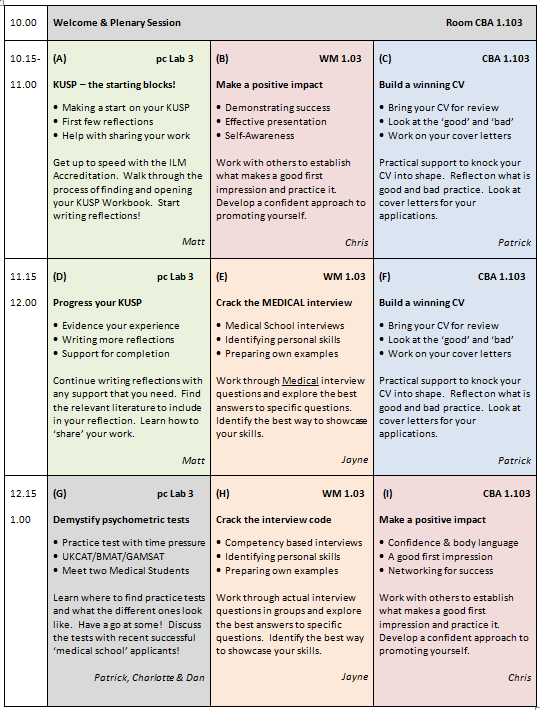
Encouraged by the initial success, we ventured further into the choice element for the Year 2 students! In this case we sent out a questionnaire asking the students what they would like to see on offer in a Year 2 skills conference so that they could drive what was on offer. The responses that we received were extremely helpful (see Fig 2). They allowed us to tailor inputs to meet specific requests and ensure that all needs were catered for (see Fig 3).
It was not all plain sailing as you can imagine. Students need to be encouraged to book onto the sessions, and constantly reminded that this was important! Questionnaires needed to be followed up, and the session bookings were not entirely reliable since some students did not book in time or changed their minds on the day! However, the end result in terms of engagement far outweighed any difficulties experienced.
The feedback that we received was very rewarding. The comments were reflective and indicated a deep level of engagement with the session content:
“I will start to practice now on the online (psychometric) tests and find more volunteer work.” “I will present myself better at the future interviews.”
“I will identify more of the transferable skills and state them in my CV. I will make my CV more specific.”
“I will analyse the situations I go through and really think about the skills I gain and how they can help me in the future.”
“… the KUSP - it’s been on my mind and I'm happy I've got more info and begun it.”
“It has kicked me in to gear to start the KUSP as I have been putting it off for a while, also, informing me that I need to start looking at internships.”
And the best comment to receive after trialling this approach was:
“I found picking the courses most relevant to me made it more interesting.”
A student-driven model for success
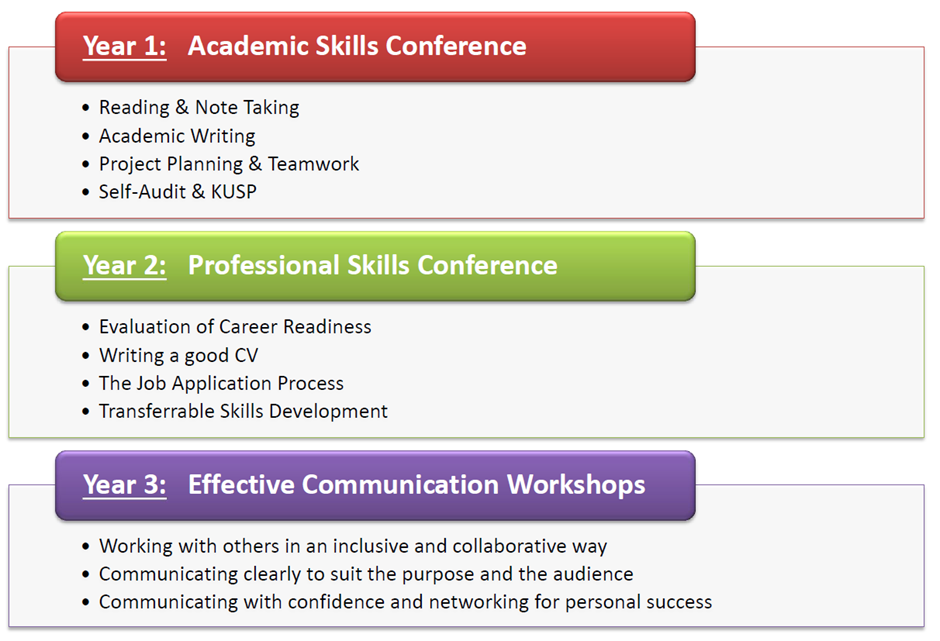
The two skills conferences now form the foundation blocks to an integrated development programme that ends with a student-led conference for Biochemistry In Practice students in their third year (see Fig 4).
Figure 4: Biochemistry & Biomedical Science Transferrable Skills Development
References
Campbell, R. J. et al., 2007. Personalised Learning: Ambiguities in theory and practice. British Journal of Educational Studies, pp. 135-154.
Department for Education and Skills, 2004. A National Conversation about Personalised Learning, Nottingham: DfES Publications.
Kay, R. & LeSage, A., 2009. Examining the benefits and challenges of using audience response systems: A review of the literature. Computers & Education, Volume 53, pp. 819-827.
Kohn, A., 1993. Choice for Children - Why and how to let students decide. [Online]
Available at: http://www.alfiekohn.org/articles/
[Accessed 20 July 2015].
Streeting, W. & Wise, G., 2009. Rethinking the values of higher education - consumption, partnership, community?, Gloucester: The Quality Assurance Agency for Higher Education.
University courses continually emphasise the active approach that students should take in learning; facilitating their own intellectual development rather than relying on passive delivery of material from lecturers (Chilwant, 2012; Rehman, Afzal, & Kamran, 2013). An expeditious method for this is through interactive teaching. Here, students are encouraged to contribute their own thoughts and ideas on the material delivered, and to apply their own experiences and conceptualisations to material they are presented with.
However, this method often works better in theory than in practice. Frequently, a lecturer may find that their suggestions for audience contributions are met with silence, and their postulation of questions are met with a shy shrug. In lectures – where the attendance may run into triple digits – students may feel embarrassed and even intimidated at lecturers efforts to “get them involved”.
Fortunately, there are numerous methods available wherein lecturers can obtain the opinions of their students without causing problems. This article attempts to outline some of these methods.
1) Small group discussion and feedback
Students are placed in small groups, and then provided with a question to discuss. The lecturer can then move around those groups, asking for group feedback
Why it works:
Belonging to a group – even one of a transient and superficial nature such as this – increases self-esteem and confidence in individuals. This reduces the anxiety that speaking aloud can cause (Rudich & Vallacher, 1999).
Students contributions become somewhat anonymised, meaning they are less embarrassed about “wrong” answers.
Potential problems:
Individuals may “coast” on the contributions of the others in their group
Groups may end up discussing other extra-curricular activities!
2) Use technology
Many options exist for students to contribute their ideas via their laptop or mobile phone. At the most basic level, students may email the lecturer in class. The freemium service Poll Everywhere is also a viable means of obtaining feedback, as is Padlet. In both, students can contribute anonymously from most electronic devices. Why it works:
Anonymity is a great facilitator for discussions such as this. By remove the evaluation anxiety, students are free to contribute their ideas (Postmes, Spears, & Lea, 1998)
Potential problems:
Gremlins in the technological works may scupper some attempts at this – always have a back-up plan
Some students may use this opportunity to demonstrate their “wittiness”
3) Writing answers down and handing them in
A low-tech alternative to the above; students simply write their ideas on a piece of paper and pass them to the lecturer. This can be combined with putting them into groups to reduce the number of pages coming in. Why it works:
See above
Potential problems:
Can be time consuming to collect paper from large numbers of students
Not very ecologically friendly
4) Offer incentives for speaking
Students are asked a question, and those that provide an answer are provided with a ticket which absolves them of answering any more questions that class/semester/year. Why it works:
As a simple cost/reward equation, students can recognise the payoff in this small contribution to the lecture
Tickets can be customised to emphasise the “light-hearted” nature of the exercise, which again reduces anxiety
Potential problems:
The lecturer must calculate the number of passes provided per class, to ensure the entire class is not in possession of one before the end of term
Forgeries may be produced by a particularly enterprising class
References
Chilwant, K. S. (2012). Comparison of two teaching methods, structured interactive lectures and conventional lectures. Biomedical Research (0970-938X), 23(3), 363–366.
Postmes, T., Spears, R., & Lea, M. (1998). Breaching or Building Social Boundaries? SIDE-Effects of Computer-Mediated Communication. Communication Research, 25(6), 689–715. http://doi.org/10.1177/009365098025006006
Rehman, R., Afzal, K., & Kamran, A. (2013). Interactive lectures: A perspective of students and leceturers. JPMI: Journal of Postgraduate Medical Institute, 27(2), 152–156.
Rudich, E. A., & Vallacher, R. R. (1999). To belong or to Self-Enhance? Motivational Bases for Choosing Interaction Partners. Personality and Social Psychology Bulletin, 25(11), 1387– 1404. http://doi.org/10.1177/0146167299259005
The MSc in Environmental Sustainability & Green Technology is a one-year interdisciplinary programme spanning science and technology, politics and social science comprising a range of taught modules and a research project.
The students are from a wide range of backgrounds, home countries and career maturity. They have a wealth of academic, personal and professional experiences that have contributed to their skills, knowledge and attitudes to date - and have also (maybe) uncovered a need for further personal development in one or more area(s).
The Keele University Skills Portfolio offered two things to this Programme - a set of useful templates to help students to reflect on their experiences - and a student-friendly ‘KUSP Workbook’ to capture and document these reflections.
The iLM Accreditation was the ‘icing on the cake’ since this gave the students recognition and endorsement, from the nationally recognised Institute of Leadership & Management, for their successfully completed KUSP.
Embedding the KUSP into the Programme was a relatively easy task. We started by introducing the concept of the KUSP in Week 1 of the overall Programme and time was set aside in a related module (Research and Business Skills) to discuss specific iLM themed reflections at the end of existing skills development sessions e.g time management & project planning, and team working & leadership (see diagram below). We then also offered KUSP ‘clinic mornings’, where students could book a half hour slot for some one-to-one coaching on their work. Finally, a message of encouragement (and offer of support) was done through the cohort Facebook page. For consistency during this pilot all portfolios were moderated by the module leader.
The result? An outstanding 47% of the cohort successfully completed their KUSP and received their certificates upon graduation.
Lessons learnt? No matter how much support you offer - there is always the need for more! We will be stepping through the completion process more thoroughly with students in the coming academic year - and ensuring that the first reflection that they do is a formative task that they submit and receive feedback on. The standard of reflections completed last year was variable, and some students did not comply with the KUSP Workbook formatting which made difficult for them to meet the criteria that had been set. Knowledge of the KUSP among personal tutors was variable - so training (via a demonstration) was given on how to access and mark the portfolios.
Current HE students are Generation ‘Y’ generally defined as 1982-2001 birth years (Knight, 2009). Generation Y students are “fundamentally different in outlook and ambition from any group of kids in the past 50 or 60 years… it is clear that they already know they don’t want to live or work the way we do” (Hill, 2002). Generation Y students have been suggested to be “mostly ‘digital natives’ connected 24/7, bored by routine and goal-orientated” (Knight, 2009), and as such, may respond positively to technology-based complementary learning environments as much or if not more so than more traditional HE learning environments. However this is a generalisation as there will be students with different technological abilities, interests and cultural backgrounds and thus the student cohort will be much more diverse and heterogeneous as pointed out by Sternberg (2012). In addition the student cohort will also include more mature students, as well as those who may be visually or auditory impaired, so this may affect educational e-gaming teaching and learning.
Educational e-gaming may therefore be a solution for effective learning in HE (see Squire, 2008). Action Research with Physical Science HE student participants to study the effectiveness of such complementary learning environments has been ongoing at Keele for the past 5 years.
An initial educational egame was developed through Keele University Innovation Awards and Teaching Innovation Project schemes, based on a geotechnical site investigation for a mine shaft (Pringle et al. 2008), the game being accessed via a web-browser interfaces and question and answer responses (see http://www.keele.ac.uk/gge/resourcesforeducation/geoteche-game/). The storyline was multi-threaded to encourage participants to repeat the exercise to continue and reinforce learning. A project to test the effectiveness of this was undertaken as part of JP’s MA in Teaching and Learning in HE and written up in Pringle (2013) which evidences the effectiveness of such an approach.
More advanced educational egames were then developed using xbox technologies with the considerable expertise of the School of Pharmacy’s developmental team of Karl Reid, Tom Pardoe and David Ledsam. Based on a real forensic search case (see Pringle & Jervis, 2010), users then progressive work through the search scenario, completing both a desk study and field investigations through an immersive virtual environment (see http://www.keelesop.co.uk/csinorthwales/). An action research project to test the effectiveness of this educational egame was also undertaken as the final part of JP’s MA in Teaching and Learning in HE.
Clearly educational egames show great potential to act as complementary learning environments to the more traditional learning approaches (Pringle, 2014 discusses this). It is planned to turn the latest egame into a free downloadable ‘app’ but requires funding.
References:
HILL, R.P. (2002) Managing across generations in the 21st Century: important lessons from the ivory trenches. Journal of Management Inquiry, 11 (1), 60-66.
KNIGHT, Y. (2009) Talkin’ ‘bout my generation: a brief introduction to general theory. Higher Education Academy Planet, 21, 13-15.
PRINGLE, J.K. & JERVIS, J.R. (2010) Electrical resistivity survey to search for a recent clandestine burial of a homicide victim, UK. Forensic Science International, 202(1-3), e1-e7.
Pringle, J.K., Stimpson, I.G., Toon, S.M., Caunt, S., Lane, V.S., Husband, C.R., Jones, G.M., Cassidy, N.J. & Styles, P. 2008. Geophysical characterisation of derelict coalmine workings and mineshaft detection: a case study from Shrewsbury, UK. Near Surface Geophysics, 6(3), 185-194.
SQUIRE, K. (2008) Video game-based learning: an emerging paradigm for instruction. Performance Improvement Quarterly, 21 (2), pp. 7-36.
STERNBERG, J. (2012) ‘It’s the end of the university as we know it (and I feel fine)’: the Generation Y student in HE discourse. Higher Education Research & Development, 31 (4), 571-583.
‘Clickerless Clickers’
Socrative is a student response system, much like TurningPoint. However, Socrative’s main USP is that no institutionally-bought devices or accounts are required to use it. Students respond to questions using their mobile devices. They simply need an internet browser to access.
For staff, a ‘teacher’ account is completely free with an educational email address. The software is web-based (found atwww.socrative.com) and intuitive to use. A brief summary of its features from a teacher/lecturer/facilitator perspective is:
You create your own room. Students simply go towww.socrative.com and log into your room. Mine, for example, is imaginatively called ChrisRoom. This log-in process means that facilitating learners to use this software is quicker and simpler than the TurningPoint clicker devices, particularly for large groups.
You can create polling quizzes containing multiple choice, true/false and short answer/open text responses to questions. Creating these quizzes is incredibly simply and you can drag and drop questions into different orders. Quizzes can also be student or teacher paced.
You can pre-enter automated responses to questions to elaborate on the question after students have answered.
Additionally you can create quick polling questions whilst teaching. You could write the question on the board then simply choose a true or false question on Socrative and see the polling results on the screen. This could allow you to change your teaching strategy mid class.
Socrative also allows you to share these quizzes with colleagues via a share code that they simply enter in their Socrative ‘dashboard’ and it copies the quiz directly across.
You can download your quizzes as polished, slick-looking pdf copies for students to use the paper-format.
Quizzes can be created so that learners remain anonymous or have to enter their name first.
Socrative will produce an Excel, or Google Doc, spreadsheet containing the data from the session which would open it up to many possible uses- gathering data for research, module evaluations, etc.
For students, Socrative is easy to use and offers an attractive user interface. When quizzes are teacher-paced, you control when students have the questions sent to their phones. The following screenshots show the Socrative interface for learners whilst waiting for a question and when responding:
The above screenshots show what the student sees when they are waiting for you to ’send’ a question, and when it appears. The interface is simple and easy to interact with for both staff and students and has been well received.
The following video sums up how to use Socrative fairly succinctly:
Why use it?
Student response systems (SRS), such as Socrative or TurningPoint Clickers, have been found to be useful, and offer significant opportunities to demonstrate understanding, provide immediate feedback for both learners and lecturers and have been seen to be positively associated with exam scores (Trees & Jackson, 2007). Heaslip et al (2014) also found that students became more engaged when clickers were used in lectures than when they were not present. Additionally, they found that students appreciated how ‘fun’ using clickers can be, and the anonymity they can afford.
However, these effects have not been without confounding variables. The implementation of SRS has been found to be indicative of wider attempts to engage students in formative questioning in weekly activities, as well as taught sessions (Poirier & Feldman, 2007). Additionally, Morling et al (2008) found that the impact of clickers could be confounded by the presentation of questions. For Morling et al, the presentation of questions is what spurs further learning and highlights gaps in knowledge to learners, not necessarily the use of clickers. Anthis (2011) study suggests that, in fact there is no statistical link between clicker use and exam scores, and further pedagogical investigation is required in order to understand the true impact of clickers.
For many lecturers, clickers et al provide a platform for immediate feedback, recapping learning and providing an insight into how your teaching is ‘going’. For us at least, Socrative has provided a platform to engage lots of users in a quick and effective way. Even with the patchiest of wi-fi connections (particularly in CBC rooms) Socrative still worked. Additionally, we have seen students seem a little ‘bored’ by TurningPoint and this does the same thing but in a fresher way.
TurningPoint is great and definitely still has uses. It’s integration with PowerPoint is particularly useful. However, colleagues have reported problems with TurningPoint interacting in difficult ways with their remote presenter devices, not installing correctly on machines and other problems. Additionally, both the Student Learning team and colleagues who have tried Socrative, have found that the fact it does not integrate with PowerPoint is actually a positive. For me it stops me relying on my slides and can often lead to students feeling they are driving the direction of the class. Colleagues have found the same: that not relying on PowerPoint slides frees them up to respond to the class more and almost form a user-led free-form class. This is obviously not applicable to every class, all of the time, but a nice option to have.
How we use it?
Example teaching strategies we have used it in are:
Recap quiz - In order to ascertain understanding of lectured material in a session for the Management School we have deployed Socrative as a means of testing how much material students remember at the end of the session. Additionally we have used it in in Criminology sessions as a way of recapping referencing systems in the run up to an assignment, this allowed us to flush out issues that Level 4 students had with referencing before the assignment.
Self-Audit Free-Form Class - In order to facilitate a self-audit activity, we have used Socrative to not only direct a free for, class responding to the feedback of the group, but this also allowed us to highlight the existing knowledge, or lack thereof, about our central services.
Student feedback, specifically around the Socrative parts of our sessions have been positive. As with clickers, students have found the interactivity and possible anonymity to be positive:
‘It made me realise others were struggling too’ Y1 Social Work student
‘Learning that there is additional help available via socrative’ Y1 MAN10018 student
‘Very interactive and fun’ Y1 MAN10018 student
It is not, however, bulletproof and dependant on the university's wi-fi strength, which is not always foolproof, as indicated by student comments indicating what would improve the sessions including Socrative:
'A stronger internet connection’ Y1 Social Work student
‘Phone would not work in socrative section’ Y1 Criminology student
Despite the above, for us it has been hugely successful in highlighting how well our central services have been promoted and advertised, as well as flushing out transitional issues and opportunities for support. Using it as a ‘taking stock’ self-audit strategy has been extremely effective. Given its capacity to produce a report there could be potential in completing module/ teaching evaluations through it. Additionally, while the website advises that Socrative is designed for 50 students, we have had significant success with groups up to 100.
Socrative continually works as a way of engaging groups of varying sizes as well as encouraging me to ditch the PowerPoint slides from time to time, forcing me to think on my feet and respond to each individual group in front of me. If you are interested in learning more, please feel free to get in touch. Additionally, Dervan (2014) offers a comprehensive review of use of Socrative as well as a thorough walk-through of the features of Socrative: well worth a read.
References
Anthis, K. (2011). “Is it the clicker, or is it the question? Untangling the effects of students response system use”. Teaching of Psychology. 38 (3): 189-193.
Dervan, P. (2014) "Increasing in-class student engagement using Socrative (an online Student Response System)." AISHE-J: The All Ireland Journal of Teaching and Learning in Higher Education. 6 (3).
Heaslip, G., Donovan, P. & Cullen, J. G. (2014) “Student response systems and learner engagement in large classes”. Active Learning in Higher Education. 15 (1): 11-24.
Morling, B. McAuliffe, M., Cohne, L. & Di Lorenzo, T. M. (2008) “Efficacy of personal response systems (“Clickers”) in large, introductory psychology classes”. Teaching of Psychology. 35 (1): 45-50.
Poirer, C. R. & Feldmann, R. S. (2007) “Promoting active learning using individual response technology in large introductory psychology classes”. Teaching of Psychology. 34 (3): 194-196.
Trees, A. R. & Jackson, M. H. (2007). “The learning environment in clicker classrooms: Student processes of learning and involvement in large university-level courses using student-response systems”. Learning, Media & Technology. 32 (1): 21-40.
The approach taken
The Graduate Diploma in Law (GDL) is designed to enable graduates with non-law degrees complete the academic stage of professional qualification and to be able to progress to the vocational stage of training to be a solicitor or barrister in England and Wales. At Keele, GDL students take some modules alongside undergraduates who have already been studying law for one or two years, so the pre-semester 1 English Legal Systems and Legal Method (ELSLM) module introduces GDL students to the law and gives them an opportunity to begin to practise some of the legal skills that they will need to successfully complete the programme.
Various skills and tools for legal research are introduced during the ELSLM module. Until 2014-15, the module also included a ‘Skills Exercise’ introduced and completed in a single day. Students were given a series of tasks to complete before returning to class for a plenary session. Whilst reflecting on this format, the teaching team identified a number of weaknesses, including: (1) some students finished quickly, and were left waiting for the plenary session to start, whilst other students would have benefited from having more time to complete the exercise; and (2) feedback in the plenary session tended to be general, rather than specific (whilst students could usefully reflect on their experience afterwards, there was not time to check individual work and give specific feedback within the day allocated for the exercise).
It was decided, therefore: (1) to issue the Skills Exercise in the form of a Google Document on the KLE at the beginning of week 2 of the 4 week teaching programme; and (2) to require students to complete a Study Skills Assessment at their convenience on Thursday or Friday of week 3 of the programme.
The Assessment was prepared using Google Forms and released by posting a link on the KLE. Some questions were multiple choice; others required text of varying length. Some questions asked students to repeat the information they had discovered as part of the Exercise; others required them to analyse or process this information to reach an answer.
After the assessment was completed, each student was sent an electronic copy of a document containing their answers, suggested answers and some general feedback. Reflection on this feedback formed part of a later teaching session.
The advantages
(1) Students were able to spend as long as they needed on the exercise, where they wished. It was, therefore, closer to what they would experience when undertaking research as part of a substantive module or after their GDL.
(2) Students were required to reflect on the information they had gathered and consider how to use it, rather than just record it.
(3) The use of Google Forms enabled individual student responses to be conveniently recorded, read and accessed by staff and the individual students themselves.
(4) Presenting the students with their answers alongside suggested answers and general feedback enabled informed reflection by students and staff before the feedback session.
The disadvantages
Neither Google Forms nor Google Sheets (used to automatically compile the answers) support discrete use of italics. Italics are used in a specific way when citing case names, so this meant that it was not possible to conveniently model or test this aspect of referencing.
Key recommendations
The information gathered by the Google Forms that students submit is compiled into designated Google (spread-) Sheet. With very small cohorts the information could simply be cut and pasted from the Sheet to provide individual feedback to individual students. In most cases, however, it will be better to use some sort of automatic ‘mail-merge’ into a standard template. This requires a Google Add-on, such as ‘autoCrat’. When using autoCrat, a little care needs to be taken to ensure that the names of the merge fields are sufficiently short and discrete (the full text of the questions tends to be too long for this purpose), but otherwise it is relatively easy to set up and deploy.
To enhance student engagement and interaction between students, I have started to make use of a small competition run during a lab session for second year Forensic Science students. In the corresponding module students need to solve a chromatographic problem, i.e. increase separation and efficiency of a method.
After students spend a lab session learning the basic principles of a gas chromatography and the importance of temperature programming, they are given a sample with seven compounds and an example chromatogram of an isothermal GC-analysis. Students are required, with a limited amount of time and trials, to improve the method from an isothermal analysis to a programmed temperature analysis with good resolution, but in the shortest possible time. The instructions given to them are shown below:
Introduction:
An example chromatogram (see Fig. 1) shows the results of an isothermal (80°C) analysis of the mixture of 7 compounds. Although all compounds are well separated, the analysis time is quite long.
Figure 1. Chromatogram of the isothermal analysis of mixture B
It is your task to develop a method through temperature programming to separate out all 7 compounds in the shortest possible analysis time. How you develop your method is all up to you as a group. The group who managed to get the best separation and the shortest analysis time will receive a prize!
Aim of this session:
In this laboratory session you will be able to
apply the knowledge of the lectures and lab session 1 to solve a problem
develop your own method in which your aim is to separate out all 7 compounds within a mixture in the shortest possible analysis time
achieve a resolution of minimal 1.5 (baseline separation) between peaks 2/3 and 4/5
Instructions:
Develop a programmed oven temperature program that is most suitable for the analysis of mixture B containing the 7 compounds.
1) What GC parameters can/should be varied
Initial oven temperature
Hold
Temperature ramp(s)
Final oven temperature
2) Rules
You are only allowed to inject your sample a maximum of 3 times!
Maximum final oven temperature is 270°C
A good separation means that all resolutions should be at least 1.50
Analysis time = retention time of the last compound
3) Remember:
Only inject when the GC is in ‘ready’ status
Start the GC temperature programming at the same time as the data collection on LoggerPro
You will need to present your method in a short presentation.
In developing their best method, they need to consider the theory and their discussions help them to use their newly obtained knowledge in solving the problem of inefficient chromatography. My experience with this approach in a lab session is that students are much more engaged in discussing their methods within their group. As they discuss how a new method may affect their chromatography they impart knowledge from one to the other and weaker students are helped in their understanding. It also gives me an opportunity the spot any misconceptions students may have, by listening to their discussions. I noticed an increase level of noise (due to increased and intensified discussions) during the lab sessions as they see the effect of a changed method, or as they want to win from peers.
I do this in the beginning of the module (week 2 or 3) and it does help to get students to discuss problems with each other or with me throughout the module.
I have used audio recordings (in MP3 format) with accompanying slides to take the place of lectures on my second year Russian politics module. As well as 12 hours of recordings, this frees up space to provide 20 or 21 hours of seminars instead of the 8 I would normally provide.
Advantages
It enables us to cover the curriculum for the module in much greater detail than previously. But at the same time it requires a great deal less preparation from me, as I don't have to prepare to give the same lecture year after year, enabling me to focus more on making the seminar time valuable, as well as providing good resources, giving more feedback, and all the other things that help enhance the student experience.
Disadvantages
I think 50 minute length is just not needed when you are exploiting audio-visual technology. A larger number of shorter recordings would be more user friendly.
Recommendations
I would pay a bit more attention to exploring the wide range of technologies I could use for lecture capture. I would also consider making the recordings available via you tube rather than the KLE for easier accessibility (you can still restrict access).
“Information literacy” is a term used to encapsulate the various skills required to make effective and appropriate use of information resources (e.g. Johnston & Webber, 2003). These skills include for example the location, evaluation, management and effective use of different types of information resource that are referred to as the “Seven Pillars of Information Literacy” (http://www.sconul.ac.uk/sites/default/files/documents/coremodel.pdf ).
Engaging effectively and confidently with advanced sources of information such as journal articles is crucial to success within many degree programmes. As such, information literacy is specifically identified as one of Keele’s essential “Graduate Attributes” (http://www.keele.ac.uk/distinctive/keelegraduateattributes/ ). The development of information literacy skills enables students for example to:
Develop a more comprehensive knowledge and understanding of the subject.
Recognise the surprising amount of debate inevitably associated with academic progress.
Identify developments at the research “cutting edge”.
Place their own research within a clear academic context.
A key problem here is that school leavers commonly lack a number of these essential skills having been largely “spoon-fed” information or having relied almost exclusively on easy-to-access sources such as Wikipedia (Mittermeyer, 2005). This can hamper effective transitions from school or college to University, and therefore the development of information literacy skills should be considered a priority within the early stages of the degree programmes that require their use.
2. Integrating information literacy training into degree-level curricula
Key information literacy skills such as the use of online search tools and referencing skills are commonly covered within the early stages of many degree programmes. However, the tendency for these skills to be covered in a discrete and often fragmented fashion can hamper their development and lead to a “tick box” approach. Johnston & Webber (2003) consequently argue that to be effective, information literacy education should be integrated more fully into the curriculum, ideally through their inclusion within credit-bearing modules.
This Solutions resource describes how this has been undertaken within Geography teaching at Keele with the support of the library and the Faculty Liason Librarian. This resource reflects an end product of a 2012 Teaching Innovation Project that considered the ways in which the information literacy skills of new students could be developed in order to bridge the gap between school and university.
Curriculum context and structure
Focus group discussions undertaken as part of a previous teaching innovation project that sought to identify barriers to engagement with journal literature (see Waller & Knight, 2012) suggested that information literacy skills should be addressed at the very start of the degree programme to develop effective practice from the outset. These skills had previously been covered within a year 1 “Geographical Skills” practical as part of an extended library introduction delivered by the Faculty Liason Librarian. The coverage was, however, limited to two sessions separated by a number of weeks. Following the recommendations of Johnston & Webber (2003), the decision was taken to give information literacy greater prominence within this compulsory year 1 module by covering the issue as the first key theme within the practical programme. This involves the delivery of four two-hour sessions that conclude with a summative “consolidation exercise”.
A summary of these sessions and the associated resources is provided below. The resources relate to the host geography module but could easily be adapted to the requirements of any programme with the assistance of the Faculty Liason Librarian. The key information literacy skills addressed within these practical sessions are addressed in greater detail within a HEA Student Study guide entitled “Enhancing Students’ Information Skills”. Whilst this is geared towards students undertaking geography, geology and environmental science, the majority of the content is generic and is again of potential use to any degree programme. [PDF – WallerSchultz2015]
Practical Resources
Session 1: Introduction to information literacy and key resources
The opening session provides an introduction to the concept of information literacy, its constituent skills and their relevance to degree-level study. [Resource, PPT FILE – S1]
The session also incorporates an introduction to the library and its facilities that includes a demonstration of basic search skills that showcase online reading lists, the library catalogue and the search facilities for Electronic and Print Journals. The primary activity involves the completion of a workbook that provides the opportunity to practice these key skills. [Resource, PDF FILE – S1]
Session 2: Searching & Browsing
The second session builds upon the basic search skills covered in session 1 and addresses the more advanced skills required to locate relevant journal literature. The session is largely based around the completion of workbook that covers the use of search engines and gateways (e.g. Google Scholar), bibliographic databases (e.g. Web of Science) and electronic journal collections (e.g. JSTOR). It also considers the formulation of appropriate search phrases using key terms, quotation marks and Boolean operators. [Resource, PDF FILE – S2]
Session 3: Locating and evaluating information
The third session considers how to make the most effective use of the “hits” resulting from a literature search. A key focus is the assessment of the reliability and credibility of sources. This includes an exercise that requires students to critically appraise a diverse range of resources that cover the same subject area.
The session also covers the effective management of information and the use of reference managers. It also considers the effective reading skills required to locate the information required quickly and efficiently. [Resource, PPT FILE – S3]
Session 4: Information Literacy Challenge
The concluding session provides some final advice on common problems such as what to do when the article you need is unavailable. [Resource, PPT FILE – S4]
The session culminates in the completion of a “information literacy challenge” that constitutes the summative assessment for this practical programme. In this way the sessions are integrated into the assessment regime of the module. [Resource, PDF FILE – S4]
3. Student feedback
Student feedback on this new practical component has generally been very positive with one student commenting:
“The teaching of referencing and databases on which to search journals was excellent and helped greatly in the transition to university.”
This highlights the important role the development of these skills can play in facilitating transitions into HE study and the importance of addressing them at the start of a degree programme. Their coverage within a sequential series of two-hour practical sessions appears to be an effective format that allows the coverage of key concepts and the incorporation and completion of interactive tasks.
References
Johnston, B. & Webber, S., 2003. Information literacy in Higher Education: a review and case study. Studies in Higher Education, 28, 335-352.
Mittermeyer, D., 2005. Incoming first year undergraduate students: How information literate are they? Education for Information, 23, 203-232.
Waller, R.I. & Knight, P.G., 2012. Overcoming the barriers to the use of journal articles with the geosciences. Planet, 25, 27-32.